3. Instalación
Note
Django en producción con Gunicorn y Nginx.
Se crea un socket ‘unix’ para la comunicación entre la aplicación y el gunicorn.
Nginx se ocupa de distribuir los ficheros estáticos de la aplicación y las peticiones al gunicorn.
3.1. Esquema
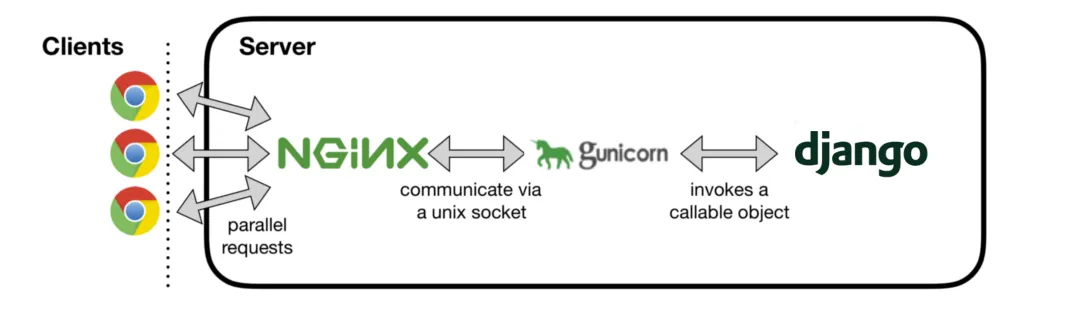
3.2. Crear socket unix
Fichero /etc/systemd/system/gunicorn.socket
1[Unit]
2Description=gunicorn socket
3
4[Socket]
5ListenStream=/run/gunicorn.sock
6SocketUser=diego
7
8[Install]
9WantedBy=sockets.target
Iniciar el socket gunicorn.socket
1systemctl enable gunicorn.socket
2systemctl start gunicorn.socket
3.3. Crear servicio gunicorn
Fichero /etc/systemd/system/gunicorn.service
 1[Unit]
 2Description=gunicorn daemon
 3Requires=gunicorn.socket
 4After=network.target
 5
 6[Service]
 7User=diego
 8Group=diego
 9WorkingDirectory=/opt/django
10ExecStart=/opt/django/.venv/bin/gunicorn \--bind unix:/run/gunicorn.sock -w 3 encuestas.wsgi
11TimeoutStopSec=5
12PrivateTmp=true
13
14[Install]
15WantedBy=multi-user.target
Iniciar el socket gunicorn.service
1systemctl enable gunicorn.service
2systemctl start gunicorn.service
3.4. Configurar la aplicación
Fichero /opt/django/encuestas/setting.py
1STATIC_URL = 'static/'
2STATIC_ROOT = os.path.join(BASE_DIR, 'static')
3STATICFILES_DIRS = [
4        '/opt/django/helloworld/static/', os.path.join(BASE_DIR,'static/')
5 ]
3.5. Configurar nginx
Fichero /etc/nginx/nginx.conf
1    server {
2          listen 80;
3          server_name _default;
4          location ^~ /django/static {
5            root /opt;
6          }
7          location ^~ /django {
8            proxy_pass http://unix:/run/gunicorn.sock;
9          }